
Type any text.
Get it in your handwriting.
Fill in one template once. Then type anything and export it as a PDF in your handwriting or as editable ink for GoodNotes.
Example shown in a sample hand — in the app, it's your own handwriting.
Free forever · 3 exports per month with a small watermark · no credit card
Paste a worked solution from ChatGPT or another AI. Fractions, roots and integrals are rendered in your handwriting too.
Perfect for greeting cards, letters, notes, worked solutions, thank-you cards, journal pages, recipe cards
Also for anyone who finds writing by hand hard — with dysgraphia or RSI, for example.
No scanner or installation needed — paper, any pen and your phone are enough.
- No credit card
- Cancel anytime
- Your handwriting stays yours
- Tracking only with your consent
How it works
Print the template
Two pages. Any printer.
Write it out
An ordinary pen, your usual handwriting. About 10 minutes.
Photograph it
Phone camera, in daylight. Your handwriting is ready to go.
Got a tablet and a stylus? Fill the template digitally instead — same result, no printing.
Turn text into your own handwriting
You type a text and TypedHand sets it from your own letters, the way you wrote them on the template. What comes out is a PDF to print or a page for GoodNotes, not a font file.
Using GoodNotes? Here is how your handwriting gets in as erasable pen strokes.
A worked answer, in your own hand
Ask an assistant to work a problem through, copy the answer with its copy button and paste it in. The formulas come out as a sheet in your handwriting.
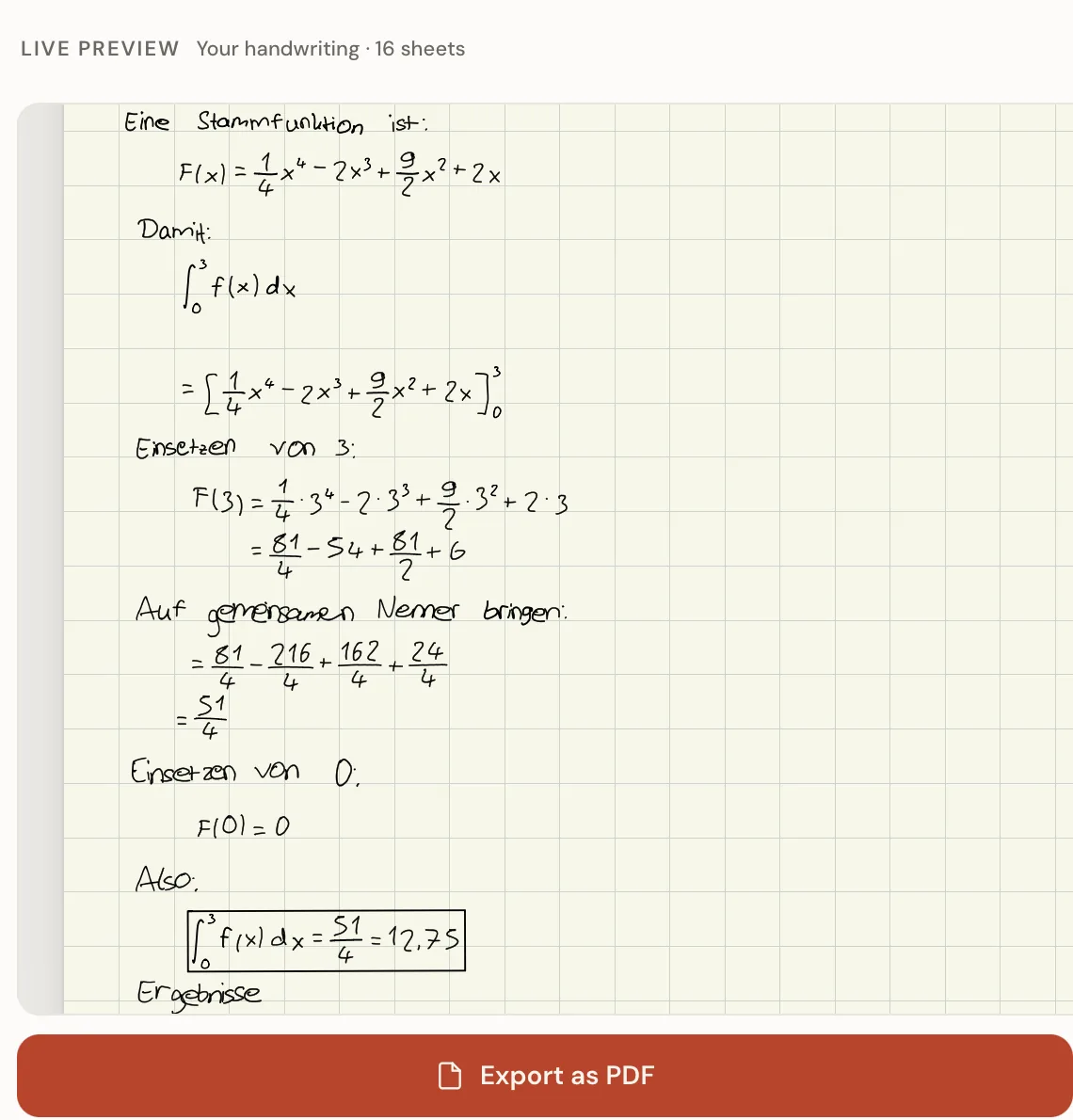
It writes the math, not a picture of it
Fractions, roots, integrals and sums, tall brackets that grow with what is inside them, and the Greek letters school math uses. No font file can do that: a fraction bar over two stacked lines is a layout, not a letter.
As a PDF, or as ink in GoodNotes
The GoodNotes export puts down real pen strokes on A4: you can erase half a formula, lasso a line and move it, and keep working on the sheet.
On every plan, Free included
Math mode itself costs nothing. The math sheet, which puts the fraction bars, roots and big operators into your own hand too, comes with Plus and Pro.
50% off your first paid month
Use code TH50 at checkout. Valid for monthly Plus or Pro; the regular monthly price applies from month two.
Valid through 31 December 2026 · limited to 25 redemptions.
Start free. Upgrade when you need more.
Every plan includes the full editor and PDF and GoodNotes export. Upgrade for more exports, no watermark and longer documents.
Free
- 3 exports per month — PDF or GoodNotes
- Full editor with natural variation and math mode
- Up to 2 handwriting profiles
- 1 page per export
- Small watermark on exports
Plus
Cancel any month
- 10 exports per month — PDF or GoodNotes
- No watermark
- Full editor and extra sheets for numbers, symbols and math
- Up to 5 handwriting profiles
- Up to 2 pages per math export
Pro
Cancel any month
- 30 exports per month — PDF or GoodNotes
- No watermark
- Multi-page PDF documents
- Up to 10 handwriting profiles
- Spanish, French and ligature sheets
- Try it first: Free costs nothing and needs no card.
- Everything you export stays yours, even if you cancel.
- There is no font file. Your handwriting works in the editor and exports as a PDF or for GoodNotes.
Real handwriting — yours.
Not a generic 'handwriting font'. Every letter comes from the template you filled in, with natural variation on every character.
Everything you type becomes a PDF: print it, or keep writing on it in GoodNotes.
Made with TypedHand
Instead of invented star ratings: real output and the person behind it.
thank-you card
greeting card
note
Every sheet above is real TypedHand output, rendered live in the founder's own handwriting — no mockups.
A note from the founder — in his own handwriting, set with TypedHand.
The first 100 accounts shape what gets built next — and get direct founder support.
Claim your spot — freeFrequently asked
Whose handwriting is it?+
Yours. You fill in a short template once — on paper with an ordinary pen, or digitally on a tablet with a stylus. From then on, everything you type comes out in your own handwriting.
What can I use it for?+
Personal cards, letters and journals; addressed envelopes and gifts; language practice; worked math solutions and study sheets; and writing by hand when a motor or writing difficulty such as dysgraphia or RSI makes it hard.
Can it write math?+
Yes. Ask an assistant to work a problem through, copy the answer with its own copy button and paste it into the editor. The fractions, roots and integrals are written out as a sheet in your handwriting, as a PDF or straight into GoodNotes. Math mode is on every plan, Free included; the math sheet, which puts the fraction bars and big operators into your own hand too, comes with Plus and Pro.
Which AI assistants work?+
We test with answers from ChatGPT, Claude, Gemini, Microsoft Copilot and Perplexity, each copied with the assistant's own copy button. Use that button rather than selecting the answer with the mouse: some assistants then copy only the displayed text of the formulas, which cannot be read back. Other assistants we have not checked.
Do I need a printer or scanner?+
No scanner needed, and no printer either if you have a tablet. Print the template (two pages), fill it in with an ordinary pen, and photograph each page with your phone — that's it. Prefer digital? Open the same template on any tablet, fill it in with a stylus in whatever note or PDF app you use, and upload the file you export.
Can I use it on iPad?+
Yes, and not only on an iPad. Any tablet with a stylus works: fill in the template in whatever notes or PDF app you use, export it as a PDF or take a screenshot of each page, and upload it. The editor itself runs in the browser on any device.
What languages does it support?+
Any language written in the Latin alphabet. Pro adds dedicated Spanish and French templates with their accented characters.
How do I cancel?+
Anytime, with effect from the end of the billing period (annual plans after their first year: with one month’s notice, the rest refunded pro rata): in your settings under “Manage subscription”, or without signing in on “Cancel your contract here”, linked at the bottom of every page. No hidden fees.
Can I download a font file (TTF/OTF)?+
No. TypedHand doesn't produce an installable font file. You type text in the TypedHand editor and export it as a PDF in your handwriting — the conversion happens every time you use the editor, not as a one-time file download.
Does TypedHand support ligatures (letter combinations)?+
Yes, on Pro: with the ligatures template, common letter pairs are written joined instead of being strung together letter by letter.
Do I need to fill out a full alphabet template?+
Yes, once: you print a template, fill it in with an ordinary pen — no tablet or stylus needed — and photograph it with your phone. After that, you type any text and it appears in your own handwriting.
Ready to write?
Create your free account, set up your handwriting, and get your first PDF in about fifteen minutes.